
Welcome to the Australian Fencing Federation website
Click on the tabs below to learn more about the functions available via the menus listed to the left of screen.
For information on how to publish different types of information to the website, refer to the headings below and click the + for detailed instructions.
Background information
News posts
News articles are called ‘Posts’. Each post can appear in more than one location on the website depending on what categories are selected. Use this to publish general announcements. The most recent posts will appear on the Home page and a list of all posts can be viewed at the News page.
Title
Add a catchy title that sums up the post content.
Body text
Add your announcement here. To retain basic formatting if copying from a Word document, ensure you have the 'visual' tab selected.
Images and pdf. Attachments can be uploaded using the ‘Add Media’ button.
Select category
News (every post should select this category)
Equipment news – posts appear on the page Equipment
Rules update – posts appear on the page Rules
Selection policy – posts appear on the page Selection Policy
Life member – posts appear on the page Life Members
More than one category can be selected.
Add featured image Optional
Add an image which will appear with the article on the front page of the website – see this post for an example. (Images added in the body of the post will only be visible once the post is opened for reading, not when it appears in summary format on the front or other pages.)
Publish
Events
The Events module is used for creating calendar entries and publishing registration links and supporting information for:
- National tournaments
- International competition tours
- HPP camps
- Coach Designated Tours (CDT)
Once created, all events will appear immediately on the Calendar.
Events can be created with only date information and subsequently edited. Venues, registration links and schedules can be added to competitions, camps and tours as they are finalised, all through this module.
Once the tag ‘registration open’ is added to an event, it will also appear on the Registrations page and other places on the website where it is useful to display a list of events currently open for registration.
Depending on what other categories are ticked, events may also appear on other pages throughout the site. For example, Coach Designated Tours will appear here Coach Designated Tours page.
Although the process for adding and editing information for all event types is the same, unique display pages have been designed for each event type. These pages contain more specific information and links to policies and operational protocols relevant to that event type. To see examples of how events will appear to visitors, see:
International Competition Tour
HPP Camp
Team announcements
Use this to announce teams selected for overseas invitation-only events:
· Asian Zone Championships
· World Championships
· Commonwealth Championships
. Oceania Championships
These announcements will appear on the Home Page
Table press
Tables have been created using this module to provide a fast and easy publication of:
- AFT/AFS calls for nominations - registration links
- Fees and charges - list
- List overseas tournaments - simple list of dates and locations (these tournaments should also be added to the calendar as events once registration is open)
- Enter overseas events - registration links
See below for instructions.
This module is also linked to the Portal and extracts information automatically to generate:
- National championship winners
- Trophy winners
- Rankings
- Coach accreditation activities
Instructions
Calendar event - National Tournaments
Title:
Choose from one of the following national tournament titles:
D.H. McKenzie (AFC#1) inc. U23 Epee (year)
Robyn Chaplin Memorial Tournament (AFC#2) inc. U23 Foil Championships (year)
AFC#3 inc. U23 Sabre Championships (year)
AFC#4 (year)
National Open and Veteran Championships (year)
Under 15 and Cadet Championships (year)
Junior Championships (year)
Schools Championships (year)
Text editing box:
Do not use.
Time and Date:
Select dates from calendar pop-up. Select ‘all day’ event.
Location:
Select location from drop-down box. If the location is not listed, create a new one following the prompts.
Organizers:
Select from a list of state fencing organisations or create a new one if required.
Event Website:
Do not use.
Event Cost:
Do not use.
More Fields
Copy in a link to the relevant online booking page for the following fields:
- Registration link for Australian fencers
- Registration link for overseas fencers
- Fencer list for Australian fencers
- Fencer list for overseas fencers
Select dates from pop-up calendar for:
- Date registration opens
- Date registration closes
Schedule:
Information can be typed and formatted directly in this box or copied in from a Word. If pasting from Word, ensure the ‘Visual’ tab is selected to retain formatting.
Featured image (optional):
Hit 'Select featured image' to open media library.


Open folder 'Featured Images' and click on any image. Hit blue button 'Set featured image' to save. Note, the featured image will not appear on the event but will be used by Facebook if the event is promoted on that platform.
Post expirator:
Select date from which event should no longer appear on the calendar. Select category the event will expire into, generally 'expired events' only.
Calendar event - Invitation overseas tournament
Title:
1. Name of tournament including year
The Events Calendar:
2. Time and date
Select dates from calendar pop-up. Select ‘all day’ event.
3. Event website
Add url for event website or Facebook page if available (refer to invitation from host organisers)
More fields:
4. City and country
Eg Tokyo, Japan
5. Date registration open
Select dates from pop-up calendar
6. Date registration closes
Select dates from pop-up calendar
5. Registration link for Australian fencers
Copy in a link to the relevant online booking page
6. Fencer list for Australian fencers
Copy in a link to the relevant online booking page
7. Results URL
Copy in link to results URL if available. Refer to FIE website tournament calendar
8. Featured image (optional)
Hit 'Select featured image' to open media library.
Open folder 'Featured Images' and click on any image. Hit blue button 'Set featured image' to save. Note, the featured image will not appear on the event but will be used by Facebook if the event is promoted on that platform.
9. Post expirator
Select date from which event should no longer appear on the calendar. Select category the event will expire into, generally 'expired events' only.
Calendar event - Coach designated tour
Create a coach designated tour event
From any page, including the dashboard, select the ‘Events’ icon at the top of screen
Name the tour
For Coach Designated Tours only, add location in the text editing box.
Add tour dates
Time and date – Select dates from pop-up calendar. Select ‘all day event’
Add registration links when available
More fields - Registration link for Australian fencers
More fields - Fencer list link
- Add registrations close date when available
- Add explanatory text, tour schedule and costs information as it becomes available.
More fields - Schedule
Information can be entered directly in this box or formatted in a Word document and copied in. If copying from Word, ensure the ‘Visual’ tab is selected to retain formatting.
- Categorise
Check ‘Coach Designated Tour’ box. This box must be checked for the event to appear on the page: Coach Designated Tours. (All coach designated tours will appear on the general calendar by default once they are created.) - Open for registration
Once a coach designated tour is open for registration, check this box. This can be done at the time of creating the event or any time thereafter. This box must be checked for the coach designated tour to appear on the page: Registrations.
- Set expiration date
To ensure coach designated tours automatically expire from the Registrations page once they are no longer open for registrations, nominate an expiration date and check the ‘expired events’ category. Expired tours will continue to appear on the calendar but not on the Registrations page.
- Publish
To publish a tour event (or save changes when editing), select publish / update as applies.
Team Announcement
1. Add new
Enter title of event including the year. Where there are two age categories run at the same tournament (eg cadets and juniors), prepare separate announcement posts for each.
Eg Asian Junior and Cadet Championships 2019
2. Location
Enter city and country
Eg Amman, Jordan
3. Dates
Enter dates (no pop-up calendar)
Eg 27 February - 2 March 2019
4. Team manager
Enter name / names of team manager/s
5. Team coaches
Enter name/s of team coaches
eg Vlad Sher (Epee), Antonio Signorello (Foil)
6. Results URL
Add results URL when and if available
7. Select names for each gender and weapon group
Place cursor in box and start a team member’s name - first or surname, it doesn’t matter. A list of possible matches will appear from the fencer biography database. Select the name, then repeat the process in the same box until all names for that gender weapon team have been selected. Repeat for each gender and weapon.

8. Add featured image
This image will not appear on the announcement post but it will be used by Facebook and Twitter if the post is promoted there. Open folder 'Featured_images' and choose a generic image featuring Australian fencers in team tracksuits.

9. Publish
HPP calls for nominations
Publish dates registrations open and close
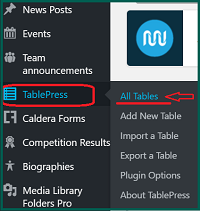
Select Table #93
TIP: Type '93' into search window locate quickly

Edit dates as required
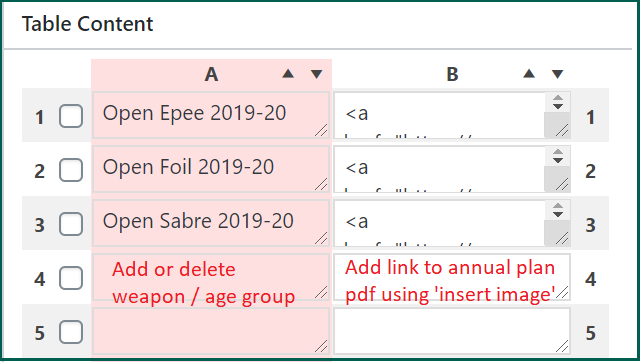
Upload current annual plans
Save annual plans as pdfs and upload to media library of website
Select Table #94
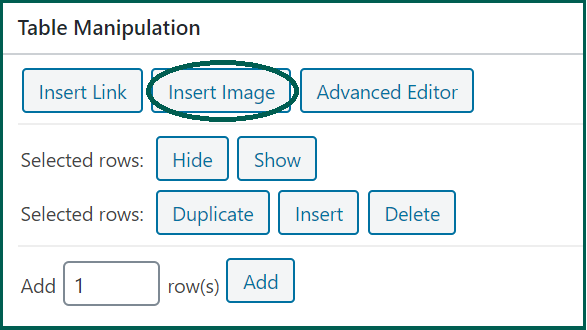
Save Changes
Fees and charges updates
List of overseas tournaments
Table press - Table 44
Add details as they become available. Once dates are published, these events should also be added to the calendar as events (see Calendar Event - Invitation Overseas Tournament above)
Enter overseas tournaments - registration links
Open Table Press
Select Table #92
TIP: Type '92' into search window to locate quickly

Add or delete information
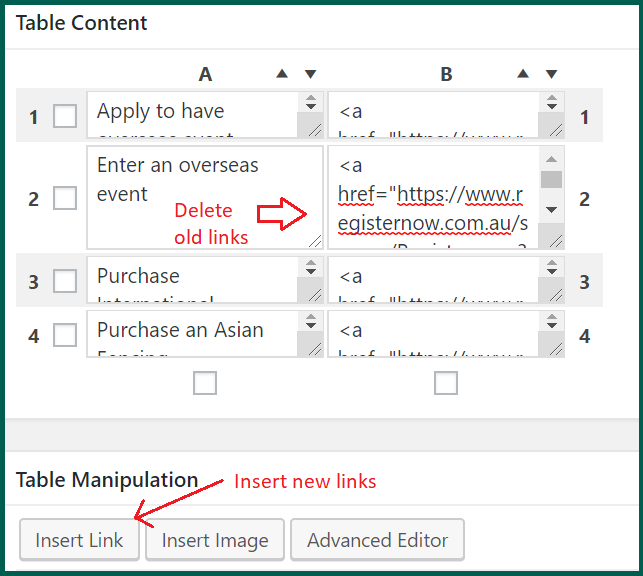
TIP: When the 'Insert Link' window opens, in addition to the field for the registration URL, there is an option to add text (eg 'Register Now' or 'Link to Register Now') to replace the long URL string for users
Save Changes
Ranking dates teams selected
Update at Table 90
This table of dates is visible on the pages: